Swap a sprite palette and split two PNG sheets with one shared grid
A red-to-blue swap followed by a blue-to-red replacement can accidentally turn both colors red. Use a simultaneous mapping: each original pixel gets one lookup, so red and blue exchange places. Then crop complete frames from the mapped sheets using the same grid settings.
A small example you can inspect
Download these two original teaching sheets: red-blue-flags.png and red-blue-lanterns.png. Each is a static 48×32 RGBA PNG with six 16×16 cells. Their frame size and sheet dimensions match the Small Batch Demo’s built-in samples. These new red/blue designs are separate from those samples.


Use frame width 16, height 16, outer margin 0 and cell spacing 0 for both sheets. Add #ff0000 → #0000ff and #0000ff → #ff0000. The version-1 example preset records exactly these values; it contains settings, not artwork. Example use terms permit personal and commercial project use.
With Sprite Batch Kit, start with an empty batch, choose Add PNG sheets for these two files, then Load preset. Select each sheet to review its original and mapped preview before choosing Download batch ZIP. If you instead choose Load 2 sample sheets, the demo creates forest-sprouts.png and little-lanterns.png and, in an empty batch, starts with three different swaps: #8de0bb → #bfa6e0, #469e7f → #8262ac and #e6b660 → #efad89. Those are not the red/blue lesson preset.
Keep the two directions simultaneous
| Original decoded pixel | One original-color lookup | Result |
|---|---|---|
| Red · 255, 0, 0, 255 | Red becomes blue | 0, 0, 255, 255 |
| Blue · 0, 0, 255, 255 | Blue becomes red | 255, 0, 0, 255 |
| Red · 255, 0, 0, 128 | RGB changes; alpha stays 128 | 0, 0, 255, 128 |
| Dark · 38, 50, 56, 255 | No matching swap | 38, 50, 56, 255 |
The newly blue pixel is not fed through the second rule. Exact matching also means #fe0000 is different from #ff0000; a nearby red or an antialiased edge is not automatically included. Choose colors from the decoded original preview when preparing your own preset.
Count the cells before cropping
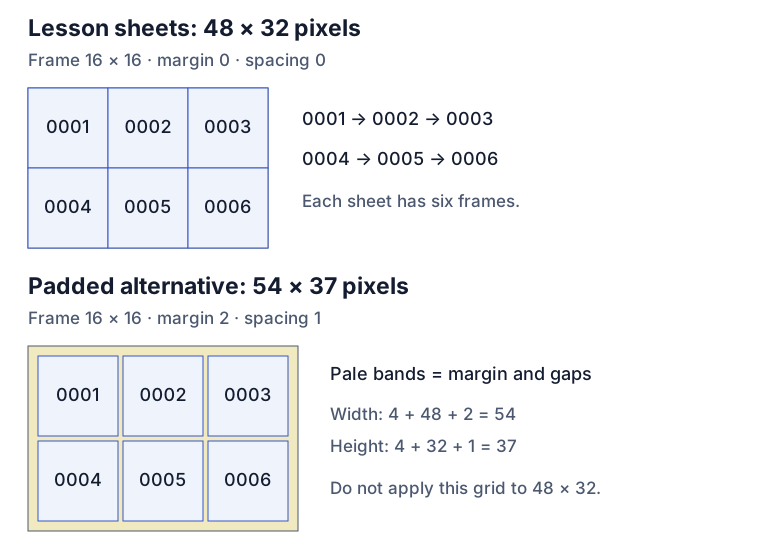
For a regular sheet, width = 2×margin + columns×frame width + (columns−1)×spacing. Use the same formula for height with rows and frame height. Here, 48 = 0 + 3×16 + 2×0 and 32 = 0 + 2×16 + 1×0: six frames per sheet, twelve for the batch.
Crop origins are (0,0), (16,0), (32,0), (0,16), (16,16), (32,16). With margin 2 and spacing 1, the same six cells would require 54×37: 2×2 + 3×16 + 2×1 = 54 and 2×2 + 2×16 + 1×1 = 37. Origins would become (2,2), (19,2), (36,2), (2,19), (19,19), (36,19). Changing those settings on a 48×32 sheet does not add padding; it makes that grid invalid.
Know what the names mean
The Small Batch Demo names the download sprite-small-batch.zip. This lesson produces two mapped sheet PNGs, twelve 16×16 frame PNGs, preset.json and manifest.json: sixteen ZIP entries in total. Expected paths include:
sheets/red-blue-flags.png
sheets/red-blue-lanterns.png
frames/red-blue-flags/red-blue-flags_0001.png
frames/red-blue-flags/red-blue-flags_0002.png
…through red-blue-flags_0006.png
frames/red-blue-lanterns/red-blue-lanterns_0001.png
…through red-blue-lanterns_0006.png
preset.json
manifest.json
Numbering runs left-to-right, then top-to-bottom. The manifest records original names, crop positions and counts. Other input names are cleaned for safe output paths and collisions receive suffixes, so check the manifest rather than assuming every original filename survives unchanged. Grid lines belong only to the preview.
Catch these mistakes before exporting a larger batch
- A correct size can still cut the artwork. The tool checks an exact mathematical grid, not where your character starts. Preview every sheet. All sheets share one frame size, margin and spacing; their dimensions may differ if each fits that grid exactly. Trimmed or irregular atlases need another workflow. Static PNG sheets are supported; animated PNG is rejected.
- Transparent does not mean empty RGB. PNG stores color independently of alpha. Sprite Batch Kit swaps browser-decoded RGB and copies decoded alpha, including zero-alpha pixels in its pixel operation. It does not preserve original PNG bytes, metadata or every hidden RGB value. The HTML canvas specification explains why premultiplied-alpha conversions can lose color precision for nonopaque pixels. Keep source masters; inspect partially transparent edges over light and dark backgrounds.
- A preset is not a validity guarantee. Loading one reuses colors and the shared grid, but exporting stays disabled if the settings do not fit the current sheets or exceed the tool’s limits. Clear batch keeps grid and colors; reloading the tool clears its workspace.
These sample PNGs and the diagram demonstrate layout and mapping; they do not certify a game engine’s import settings. Check the exported frames in the application that will use them.
Optional tools after the example
If you use the free Small Batch Demo, stay within two sheets, 32 frames total, 512 pixels per side, 1 MiB per input PNG and 400,000 batch pixels. Its ZIP limit is 8 MiB, with at most 36 entries and 4 MiB per entry. Both versions allow 32 swaps and 64 KiB preset files. This lesson uses only 3,072 input pixels and twelve frames.
The optional full Sprite Batch Kit raises the limits to 32 sheets, 2,048 frames total, 4,096 pixels per side, 16 MiB per input PNG, 8,000,000 batch pixels and a 128 MiB ZIP. These are capacity limits, not speed or device guarantees. The local tool does not upload the selected sheets; following the product link opens itch.io. Development and the original teaching assets used AI assistance. This guide and its sample files require no purchase.